The Good AI Consultant Framework
AI consulting for small business is a crowded category where $15,000–$30,000 decks are the main product. A few practitioners earn the fee. Most do not. You get an email from someone calling themselves an “AI Strategy Consultant.” They want to talk about “unlocking AI for your business.” Their company name has “AI” or “Future” or “Transform” in it. Their LinkedIn pitch is polished. They mention clients you’ve heard of.
You take a meeting. The conversation feels smart. They ask questions. They’re interested. By the end of the call, they’re pitching you a $30,000 engagement to “develop your AI strategy.”
Three months later, you have a 40-page PowerPoint deck about your “AI Roadmap.” It talks about generative AI, machine learning, computer vision, large language models. It recommends you hire an AI engineer. It recommends you build a data lake. It recommends you invest in model training.
The consultant gets paid. You have a roadmap. Neither of you has actually solved anything.
That’s bad AI consulting. It’s everywhere. And it’s expensive.
AI Consulting for Small and Mid-Market Business: The Hard Numbers
Hiring an AI consultancy for a small or mid-market business should cost $5K–$15K for discovery, $3K–$10K for a pilot, and $20K–$50K for implementation – $30K–$80K total over 12–18 weeks, paid phase by phase, from a consultant with no financial ties to the tools they recommend. If the implementation phase grows into a real build, the AI implementation cost guide has the 2026 bands by engagement type and company size.
| What you’re buying | Defensible number |
|---|---|
| Discovery – define the problem and the options | $5K–$15K, 1–2 weeks |
| Pilot – one team, one workflow, measured results | $3K–$10K, 2–4 weeks |
| Recommendations and roadmap | $2K–$5K, 1 week |
| Implementation – rollout, training, integration | $20K–$50K, 8–12 weeks |
| Total typical engagement | $30K–$80K over 12–18 weeks |
| Strategy-deck-only engagement (the market’s main product) | $15K–$30K – usually not worth it |
| Red flag | The full $40K requested upfront |
| Independence test | No financial relationship with the tools they recommend |
Those are the numbers to hold any proposal against. The rest of this guide is how to tell the consultants who earn those fees from the ones selling decks.
Weighing a consulting proposal right now?
Send it over or bring it to a 15-minute call – we'll tell you whether the phasing and the fee hold up against these numbers. No pitch; that's the whole meeting.
Get a proposal sanity check →What Bad AI Consulting Looks Like
Bad AI consulting follows a consistent playbook. It’s worth understanding because you’ll recognize it when you see it.
It starts with the technology, not the business problem. The consultant’s opening slides are about “What is AI?” and “The AI Landscape.” They walk you through transformer models and neural networks. What should happen first is they ask about your business – the problems you’re solving, the constraints you’re working within, how your team operates. But that’s less interesting than explaining machine learning, so they skip it. They lead with the sexiest part of the story instead of the thinking part. Red flag.
It recommends expensive solutions to problems you haven’t defined. “You should build a data lake.” “You should hire an AI engineer.” “You should invest in model training.” Maybe all three are true. Maybe they’re all catastrophic wastes of money. The consultant doesn’t know yet, but they’re recommending them anyway because it sounds authoritative. Good consultants define the problem first, then match the solution to that problem. Bad ones lead with solutions and assume the problem exists somewhere.
It treats “AI” as the goal, not the means. The distinction here matters. Good consulting ends with: “Here’s the specific business problem. Here’s how technology – which might be AI, might not be – solves it. Here’s the cost. Here’s the timeline.” Bad consulting ends with: “Here’s how to do AI in your organization.” It assumes AI is the answer before it understands the question. It’s solving for AI adoption, not for your business.
It focuses on what’s technically possible instead of what’s commercially viable. “You could build a recommendation engine powered by a fine-tuned LLM trained on your customer data.” Technically true. But the cost might be $200,000 and the annual value might be $30,000. That’s not a good investment. A good consultant calculates the business case before making the recommendation. A bad consultant gets excited about what’s possible and leaves you to figure out whether it’s worth it.
It handwaves the implementation. “And then you’ll need to integrate this with your existing systems.” That sentence is doing way too much work. Integration is hard. It’s expensive. It creates new risks. It requires your team’s time and attention. But in bad consulting, it gets glossed over because it’s not as interesting as the shiny technology part. A good consultant says: “Implementation will likely take 8-12 weeks because you’ll need to integrate with three legacy systems, your team will need training, and there will be a 2-3 week productivity dip while everyone adjusts.” That’s the kind of specificity that means they’ve thought through the reality.
Key Signal
If a consultant's recommendation includes a sentence like "and then implement this," they haven't thought through your reality. Good consultants say "implementation will likely take 8-12 weeks because you'll need to integrate with three legacy systems, your team will need training, and there will be a 2-3 week productivity dip while everyone adjusts." If they gloss over implementation, their recommendation is theater, not strategy.
The final sin: expensive artifacts instead of outcomes. You pay $30,000-50,000 for a consulting engagement and you get back a beautifully formatted document with recommendations. That’s the deliverable. What you don’t get is someone actually helping you implement those recommendations. What you don’t get is someone willing to say “actually, this won’t work for you because of X.” It’s much easier to write recommendations than to make them work. A consultant who takes the hard path – helping you execute, pushing back when you’re heading the wrong direction, staying involved until there’s actual impact – costs more upfront but delivers way more value.
Common Failure Mode
You hire a consultant for $40,000 to develop your AI strategy. They deliver a 50-page deck recommending you implement AI customer support and build a data pipeline. You've got a beautiful roadmap. You also have no idea how to actually do those things, what they'll cost, or how long they'll take. The consultant is gone. You're stuck implementing solo. The deck gets shelved. Six months later, you're still not doing anything with AI. You spent $40K and got a paper strategy that was never actionable in the first place.
The Difference Between Sales and Strategy
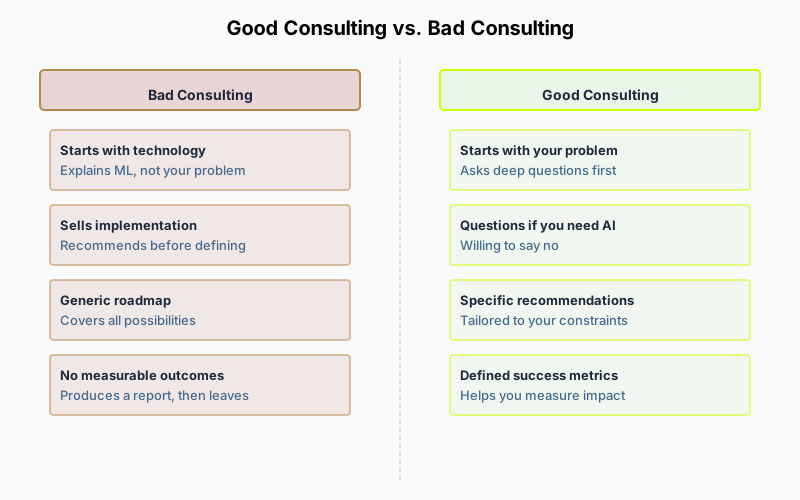
Here’s the core distinction that matters most: most AI consultants are actually salespeople. They’re sales for vendors, for big tech companies, for implementation firms. They’re being paid – directly or indirectly – to sell you a vision of AI that requires purchasing something. Their incentive structure points toward the sale.
A real strategist is the opposite. A real strategist is willing to tell you that you don’t need AI. They’ll tell you to wait. They’ll tell you to hire a person instead. They’ll tell you that you’re not ready yet and here’s what to fix first. The same principle applies to selecting any technology partner – the advisors worth listening to are the ones without conflicts of interest. What a real engagement produces – assessment, opportunity map, build-versus-buy calls, roadmap – and the 2026 rates to hold a quote against are in our guide to AI strategy consulting.
Real strategy advice sounds like this:
- “You don’t have enough customer service volume to justify an AI chatbot yet. Wait 6 months until you’re at 200+ tickets per month. Then revisit it.”
- “Your competitive advantage is your team’s judgment. If you replace that with AI, you lose what makes you different. Don’t do it.”
- “You could use AI here, but you could also just hire a $40,000/year person to do this work. The AI tool costs $15,000/year, but it’s worse than the person. Hire the person.”
- “AI is worth investing in here, but not for 2 years. First, you need to solve these three operational problems, then we’ll build on top of that.”
These recommendations aren’t sexy. They don’t sell software. They don’t create implementation projects for the consultant to manage. A salesperson wouldn’t make them. A strategist would, because they’re thinking about your business, not the sale.
Questions to Ask
Ask your potential consultant: "Tell me about a recommendation you made that a client didn't take. What was it? Why did you recommend it? Did you push back when they said no?" If they can't think of one, they've never made a real recommendation – they've only told clients what they wanted to hear. Real strategists have a track record of saying no.
What Actually Matters in AI for Your Business
Most AI consulting drones on about the technology. It should talk about your business and whether AI actually helps it.
What actually matters? Start with your competitive position. If your competitors aren’t using AI and you implement AI before them, that creates real value. If everyone’s already using it and you’re playing catch-up, the value of that AI is much lower. A good consultant asks: “What’s the competitive landscape? If we do nothing with AI, how much do we lose in market position?” That’s a question that shapes everything that follows.
Your specific constraints matter too. You might need AI for customer support, but you also need it to be HIPAA-compliant or GDPR-compliant or SOC 2-compliant. Or you need it to integrate with a legacy system from 2010 that doesn’t have APIs. Or you need it to work offline. These aren’t minor details – they change everything about what’s possible and what’s viable. A good consultant understands your constraints before recommending solutions instead of discovering them mid-project.
Your team’s capacity is often the binding constraint. If you don’t have a single person who can manage an AI implementation, you’re not implementing AI – you’re hiring someone to do it, and that’s a 6-month hiring process plus 3 months of ramp-up. That’s a real constraint that most consultants ignore because it’s not sexy. But it’s the truth for most small businesses.
Your financial constraints shape what’s possible. You might have a $10,000 budget, not a $100,000 budget. A good consultant designs solutions within your actual budget. A bad consultant designs the ideal solution and tells you to raise your budget or scale back your vision.
And organizational readiness matters more than most people admit. Some organizations are ready for AI. They have good data, they have processes and workflows that AI can actually improve, they have the change management capability to implement something new successfully. Some organizations are a mess – their data is bad, their workflows are chaotic, they’re not ready for anything new. A good consultant will tell you: “You’re not ready yet. Fix these things first, then we’ll revisit.” That’s hard advice to hear but it’s the kind that saves you money.
The Questions a Good AI Consultant Asks First
If you’re interviewing a consultant or firm, here are the questions they should ask you. If they don’t, that’s a warning sign.
“What’s the business problem you’re trying to solve?” Not “what’s the AI opportunity” or “where could we use AI.” The business problem. Good consultants start here. They want to understand your business before they recommend technology. They’re trying to define the problem tightly. “We’re losing customers” is too vague. “We’re losing 10% of customers after the first month because the onboarding process is confusing and takes three weeks” is specific enough that you can actually solve it.
“What have you tried already?” This tells them whether you’ve already gone down certain paths, what worked, what didn’t. Maybe you’ve already tried to solve this problem with process changes and it didn’t work. Maybe you’ve already built something custom and it’s unmaintainable. They’re trying to avoid recommending something you’ve proven doesn’t work.
“What would success look like?” Not “we want to use AI.” Success is concrete and measurable. “Success is reducing onboarding time from 3 weeks to 1 week.” Or “Success is increasing customer support volume from 50 to 500 emails per week without hiring new people.” They want to know what you’re measuring and what the target is.
“What’s your budget for this?” They’re not trying to sell you an expensive solution. They’re trying to design a solution that works within your constraints. If your budget is $20,000 and the right solution costs $100,000, a good consultant will tell you that straight up and recommend waiting or redesigning.
“Who on your team will own this after implementation?” They’re trying to understand if you have the capacity to maintain whatever they recommend. If the answer is “nobody, we’d need to hire someone,” that’s a constraint. That might kill the whole recommendation.
“What’s keeping you from solving this yourself?” They’re trying to understand why you need outside help. Maybe you do. Maybe you just need a framework. Maybe you just need someone to help you think through it. Not every problem requires a paid consultant.
How to Evaluate a Consultant or Firm
You’re looking for someone who will give you honest advice, not someone who will sell you something.
Red flags:
- They immediately recommend “building an AI roadmap” or “developing a data strategy” without understanding your business. (They’re selling engagement hours, not solutions.)
- They talk primarily about technology and rarely about business impact.
- They reference tools, vendors, or implementation firms they have relationships with. (They have a financial incentive to recommend certain solutions.)
- They’re vague about implementation costs and timelines. (They’re hiding something.)
- They get defensive when you push back on their recommendations. (A good consultant welcomes challenge.)
- They don’t ask about your constraints, budget, or team capacity.
- They can’t show you clear before/after examples from previous clients.
Green flags:
- They ask detailed questions about your business and your constraints before making recommendations.
- They’re willing to say “you don’t need AI for this” or “this isn’t worth it.”
- They have experience in your industry or your problem space.
- They can show you specific examples of what they’ve done with previous clients, with numbers.
- They’re transparent about what they don’t know and what would require additional research.
- They recommend a small pilot or quick engagement before a big consulting contract.
- They’re more interested in whether it will work than in whether you’ll buy it.
Questions to ask directly:
- “Tell me about a time you told a client not to do something they wanted to do. What happened?”
- “What’s the worst implementation of AI you’ve seen in a company like ours?”
- “Can you show me 2-3 specific client examples with real metrics?”
- “What’s the failure rate on the recommendations you make? How often do they actually move the needle?”
- “What would change your mind about this recommendation?”
If they can answer those honestly, they’re probably a good consultant.
The Right Way to Use an AI Consultant
If you do hire a consultant, structure the engagement correctly. Don’t pay for a big strategy engagement upfront and then be left to implement on your own.

| Phase | Duration | Cost | Deliverable |
|---|---|---|---|
| 1. Discovery | 1–2 weeks | $5k–$15k | Define problem & options |
| 2. Assessment (pilot) | 2–4 weeks | $3k–$10k | Pilot solution, measured results |
| 3. Recommendations | 1 week | $2k–$5k | Strategic plan & roadmap |
| 4. Implementation | 8–12 weeks | $20k–$50k | Full rollout & training |
Total typical engagement: $30k–$80k over 12–18 weeks. Pay phase by phase – don’t commit to implementation until the pilot proves it works.
Phase 1: Discovery (1-2 weeks, with 2-4 weeks of consultant work). The consultant meets with your team. They understand your business, your constraints, your team capacity, what you’ve already tried. They document what they learn. They tell you if AI makes sense at all. They tell you what your options are. The outcome is a clear recommendation and a decision point – not a pretty deck. Cost: $5,000-15,000. This discovery process is similar to the structured vendor search approach, but focused on whether you need to buy anything at all. Most discovery engagements take 2-3 weeks total.
Phase 2: Pilot (4 weeks). If the recommendation is to move forward, you run a pilot. The consultant helps you pick a tool or solution. You implement it on one small team or for one specific workflow. You measure the results. You decide if it worked. Cost: $3,000-10,000 plus your team’s time. Outcome: proof that this will work (or proof that it won’t). This is where you learn whether the theory actually applies to your reality.
Phase 3: Implementation (8-12 weeks). If the pilot worked, you roll it out more broadly. The consultant helps with integration, training, change management. Cost: $20,000-50,000 depending on scope. Outcome: the tool is implemented, your team knows how to use it, and you’ve got the support to make it stick.
The structure matters. Don’t pay for a big strategy engagement upfront. Pay for discovery. Pay for a pilot. Pay for implementation help. That’s how you protect yourself from paying for theater.
Key Signal
The best consultants will push back when you want to hire them. "Before we do a 12-week engagement, let's do 2 weeks of discovery for $5,000. Then we'll both know if this is actually worth it." If a consultant immediately agrees to a $40K engagement without pushback, they're closing a sale, not solving a problem. A consultant who fights for a smaller, lower-risk engagement first is someone you can trust.
Conclusion
Most AI consulting is people with PowerPoint skills selling expensive engagements. Real consulting is someone who understands your business so deeply that they can tell you whether you need AI at all.
The consultant worth paying is the one who’s willing to say: “Here’s what you should do, and here’s why. And if you want to go a different direction, here’s why that’s wrong.” Not the one who nods along with your ideas and then creates a beautiful roadmap.
If you’re going to hire an AI consultant, hire one who will fight with you. Not one who will agree with you.
Related Guides
- Do You Need an AI Strategy Consultant? – A decision matrix for whether to hire outside help at all
- AI Tools for Small Business: A Buyer’s Guide – Evaluate specific tools honestly
- AI for Startups – Different audience, same honesty about what AI does and doesn’t do
- AI Design Agencies – If the work is actually design-adjacent, you may be shopping the wrong category
- How to Select an AI Development Partner – For implementation engagements that go beyond consulting
- How to Select a Technology Partner – If you’re hiring a consultant, they’re a technology partner; use this framework
- Technology Vendor Due Diligence Checklist – Questions to ask before hiring any advisor
Frequently Asked Questions
How much does AI consulting for a small business cost?
The market runs $15,000–$30,000 for a strategy deck. Good engagements split into phases: $5,000–$15,000 for discovery, $3,000–$10,000 for a pilot, $20,000–$50,000 for implementation. Avoid any consultant who wants the full $40,000 upfront.
What does a good AI consultant actually do?
They start with your business problem, not the technology. They tell you when not to use AI. They calculate the business case before recommending solutions. They include implementation realities in the estimate. Good consultants fight with you.
How do I tell an AI consultant from a salesperson?
Ask what they have told clients not to do. Real strategists have a track record of saying no. Salespeople don't. Good consultants also ask about your budget, constraints, and team capacity before recommending anything. Salespeople jump to solutions.
What are the red flags when hiring an AI consultant?
They lead with technology, not business impact. They cannot name specific ROI metrics. They handwave implementation. They have financial relationships with the tools they recommend. And they get defensive when you push back – a good consultant welcomes challenge.
Should I hire an AI consultant or buy tools directly?
Buy tools directly if your problem is well-defined and matches an off-the-shelf solution. Hire a consultant when the problem is ambiguous, the stakes are high, or you need an honest opinion about whether AI fits your business at all.
How should an AI consulting engagement be structured?
In phases. Phase 1: two-week discovery ($5,000–$15,000). Phase 2: a four-week pilot ($3,000–$10,000). Phase 3: implementation, only if the pilot worked ($20,000–$50,000). Pay for each phase separately. A consultant who resists that structure is selling a bundle.
What questions should I ask before hiring one?
Tell me about a recommendation a client declined – and why you made it. Show me specific client examples with real numbers. What's the failure rate on your recommendations? What would change your mind about this one? Good consultants answer honestly.
Should a small business hire an independent AI consultancy or a vendor partner/reseller?
Independent. A consultancy with financial relationships to the tools it recommends – a vendor partner or reseller – has an incentive structure that points toward the sale, not your outcome. The independence test: ask what they have told clients not to buy. Real strategists have a track record of saying no; partners and resellers rarely do.
Should a small business start with AI tools or an AI consultant?
Start with the problem, not the vendor: quantify what it costs you, then pilot for four weeks and commit only if value beats cost by at least 2x. Low-complexity, low-impact problems suit off-the-shelf tools under $100/month. If the problem is high-impact and nobody inside can scope it, a $5,000–$15,000 consultant-led discovery comes first.