Website Project Structure Framework
Website design decides how a site should look, read, and flow. Website development turns those decisions into working code. Different skills, different tools, different people – and most companies end up with the wrong website because they conflate the two.
You hire a “web design agency” and end up with Figma comps that your developer can’t build. Or you hire a developer to build from a design, and they say, “I need to rebuild this – the design doesn’t account for responsive behavior.” Or you hire a full-service agency and get mediocre design AND mediocre development because nobody’s actually excellent at both.
Website design and website development are different skills. They require different thinking. They require different tools. They require different people. You can have a great designer and a mediocre developer (or vice versa), and the website will be broken.
Understanding the difference is critical to hiring right and building a website that works.
What each engagement costs, and how long it takes:
| Engagement | 2026 range | Timeline |
|---|---|---|
| Website design only | $5K–$40K | 3–6 weeks |
| Website development only | $8K–$60K | 4–12 weeks |
| Design + build, typical site | $20K–$80K | 10–24 weeks end to end |
| Small marketing site | $30K–$60K | – |
| Medium business website | $50K–$100K | – |
| Large website | $100K–$250K+ | – |
| Web application | $150K–$500K+ | – |
Website Design and Website Development Are Different Disciplines
Website design is the problem-solving part. What is this website for? Who are the users? What do they need to do? What should they see first? How should information be organized? What buttons matter? What should the layout be? How should this work on mobile vs. desktop?
Website design is about user experience, information architecture, and visual design. It’s about answering the question: What should this website be?
Website development is the building part. The designer says, “Here’s what it should be.” The developer says, “Now I’m going to build it with code.”
Website development is about writing HTML, CSS, JavaScript, building a database, setting up hosting, making forms work, integrating with tools, optimizing for speed, ensuring security.
Here’s how the skills map to each discipline:
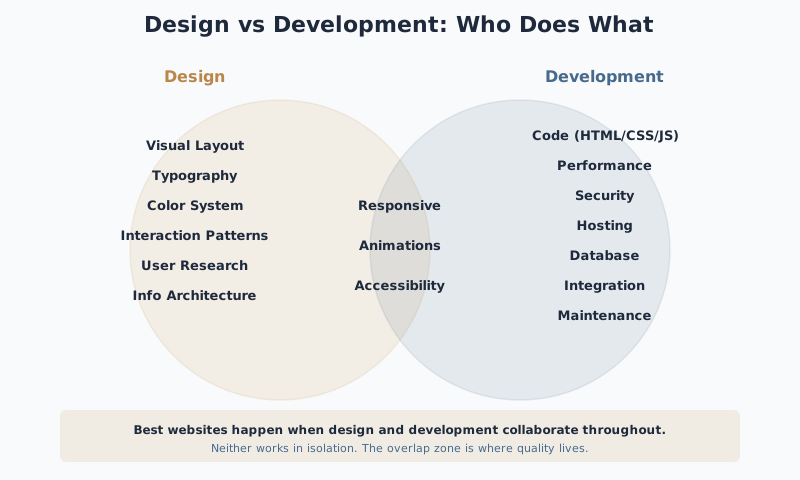
Design owns: Visual Layout, Typography, Color System, Interaction Patterns, User Research, Information Architecture
Shared (overlap): Responsive design, Animations, Accessibility
Development owns: Code (HTML/CSS/JS), Performance, Security, Hosting, Database, Integration, Maintenance
The confusion happens because:
- A designer can mock up a website that looks great but isn’t possible to build efficiently
- A developer can build something that technically works but has poor UX
- A designer might not understand technical constraints (responsive design, performance, browser compatibility)
- A developer might not understand that their code decisions have UX implications
The best websites happen when design and development inform each other. The designer knows what’s technically feasible. The developer understands why specific UX decisions matter. This same principle applies to product design agencies and any larger design engagement.
Common Failure Mode
Designer and developer don't talk until handoff. Designer delivers beautiful comps. Developer builds something functional but clunky because they had to work around the design's unrealistic assumptions. Both blame each other. Timeline slips. Budget explodes.
What Website Designers Actually Do
Design Responsibilities
Website designers solve problems about how people use the website.
They:
- Define what the website is for (what should a user accomplish?)
- Understand the users (who are they, what do they want, what are they trying to do?)
- Organize information architecture (how should content be structured?)
- Determine interaction patterns (how should users navigate, submit forms, find information?)
- Create information hierarchy (what should be prominent, what should be secondary?)
- Design for context (how does this work on desktop? Mobile? Different screen sizes?)
- Make visual decisions (typography, color, spacing, imagery, layout)
- Test the design (do users understand the flow, can they accomplish tasks, is it confusing?)
Designer Deliverables
What they output:
- Wireframes (low-fidelity layouts that show information structure)
- High-fidelity mockups (the visual design, showing colors, typography, imagery)
- Prototypes (interactive versions that show behavior and flow)
- Design specifications (annotations explaining decisions, spacing, interaction behavior)
- Design system (reusable components and patterns for consistency and scalability)
Designer Non-Responsibilities
What they don’t do:
- They don’t write code
- They don’t set up servers or hosting
- They don’t optimize for performance
- They don’t ensure accessibility or browser compatibility (though good designers think about these)
- They don’t manage content or SEO strategy (though good designers structure the site to support it)
Common website design deliverables:
Minimal (quick turnaround, lower cost):
- Wireframes
- High-fidelity mockups
- Basic design system (color, typography, button styles)
Questions to Ask
Will you deliver design files (like Figma) that developers can inspect for spacing, sizing, and interactions? Or just static PDFs? Developers need the files to understand your decisions, not just screenshots.
Standard (most projects):
- Wireframes for key pages
- High-fidelity mockups with interactions
- Design system with components
- Design specs (spacing, colors, typography, responsive behavior)
- Prototype for testing (optional)
Comprehensive (large budgets):
- Extensive user research and testing
- Detailed wireframes for all pages
- High-fidelity designs
- Full design system
- Interactive prototype
- Extensive design documentation
- Hand-off and collaboration with developers
What Website Developers Actually Do
Website developers build the website in code.
They:
- Write HTML, CSS, JavaScript
- Set up the server/backend that runs the site
- Build databases for dynamic content
- Create forms and integrate them with your backend
- Optimize for speed and performance
- Ensure the site works across different browsers and devices
- Set up hosting, CDN, security
- Integrate third-party tools (analytics, email, payment processing, CRM)
- Fix bugs and maintain the site
What they output:
- A functional website (live on the internet, working)
- Source code (repository, documented, maintainable)
- Hosting and domain setup
- Analytics and monitoring
- Documentation for maintenance
What they don’t do:
- They don’t design the visual experience (though they implement it)
- They don’t solve user problems (though their code enables solutions)
- They don’t create content strategy (though their code displays content)
- They don’t make decisions about what the website should be (though they advise on feasibility)
Common website development approaches:
Static site (simpler, cheaper):
- HTML, CSS, JavaScript frontend
- Simple hosting (AWS S3, Netlify, GitHub Pages)
- No backend/database
- Limited interactivity (works for marketing sites, blogs, brochures)
Dynamic site (more complex):
- Frontend code (HTML, CSS, JavaScript)
- Backend code (JavaScript/Node, Python, Ruby, etc.)
- Database
- User authentication, forms, dynamic content
- More expensive and slower to build
Full-stack framework (standard for web apps):
- Modern framework like React, Vue, or Next.js
- Backend API
- Database
- Real-time updates, complex interactions
- Requires strong developers
CMS-based (middle ground):
- Frontend design
- WordPress, Webflow, or similar CMS
- CMS handles some backend functionality
- Easier to maintain, less coding required
- Some constraints on customization
When You Need Design, When You Need Development, When You Need Both
You need website design if:
- You’re unclear what your website should accomplish
- You’re not sure how to structure the information
- You want professional-looking visuals
- You want the site to work well on mobile and desktop
- You want to validate design decisions with users before building
- Your current site has UX problems (confusing navigation, unclear messaging)
Budget: $5k–$30k depending on scope and complexity
You need website development if:
- You already have a design (from a designer or a template) and need to build it
- You need dynamic functionality (user accounts, forms, database)
- You need integration with other tools (payment, email, analytics)
- Your site needs custom functionality or logic
- You need performance optimization
- You’re building a web app, not just a marketing site
Budget: $15k–$100k+ depending on complexity
You need both if:
- You’re building a new website and have no clear design direction
- Your existing site needs a redesign (both visually and functionally)
- You’re transitioning from a template to custom
- You want the design to be optimized for how it will actually be built
- You have complex interactions or functionality that requires design + development thinking
Budget: $30k–$150k+ depending on scope
Red flags when hiring:
-
Someone offering “design and development” as the same service: They can do one well. Usually not both. It’s like hiring an architect and a contractor to be the same person.
-
Design firm that hands off to a “development partner”: Often the developer gets a design that’s not buildable. Chaos ensues. Good teams have integration between design and development.
-
Developer saying, “We can design it ourselves”: They can build it. The design will be mediocre. You can have functional and ugly. You can’t have beautiful and broken.
-
Designer creating a design that the developer says “isn’t feasible”: This means design and development didn’t collaborate. Bad process.
Key Signal
Ask if the designer and developer have worked together before. Have they built things together? Do they know each other's constraints and language? A team that works together repeatedly will catch problems early. A random pairing will discover issues during development.
How to Structure the Engagement So It Actually Works
The wrong way (sequential, waterfall):
Phase 1: Hire a designer. They design. They hand off. Phase 2: Hire a developer. Developer says, “This design isn’t responsive” or “This interaction is complex” or “This will be slow.” Phase 3: Redesign or rebuild. Budget + timeline explode.
The right way (collaborative, iterative):
See this timeline showing how each phase flows and who leads:
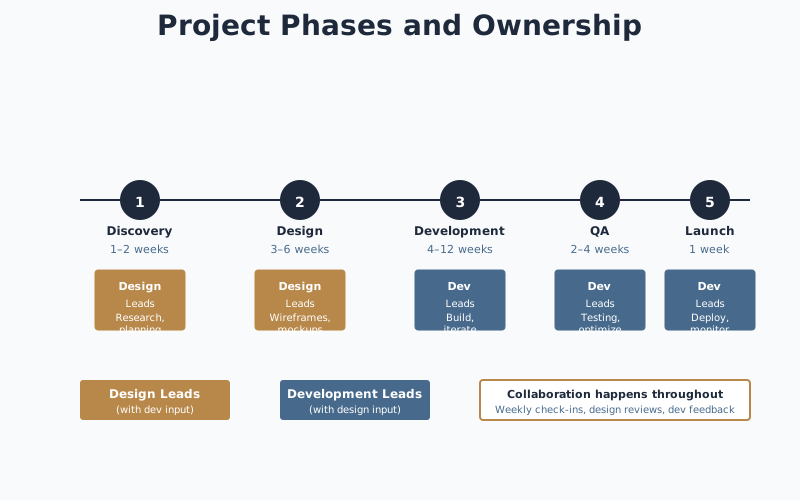
Phase 1: Strategy and planning (both design and development)
- Define what the website is for
- Map user flows
- Discuss technical constraints and opportunities
- Designer knows what’s technically possible
- Developer understands the UX requirements
Duration: 1–2 weeks
Phase 2: Design
- Designer creates wireframes and high-fidelity designs
- Incorporates feedback from developer about technical feasibility
- Tests with users if needed
- Designer delivers design specs and components
Duration: 3–6 weeks depending on scope
Phase 3: Development
- Developer builds using design as reference
- Uses component from design system
- Tests as they build
- When something doesn’t quite work as designed, designer and developer figure it out together (not one blaming the other)
Duration: 4–12 weeks depending on complexity
Phase 4: Testing and launch
- Quality assurance
- Performance optimization
- Launch and monitoring
Duration: 2–4 weeks
The key is collaboration, not handoffs.
Hire a design firm and a development firm that communicate with each other. Or hire a full-service team where design and development report to the same leader and have integrated process.
What to specify in your contract:
-
Design outputs:
- Wireframes for [X pages]
- High-fidelity mockups for [Y pages]
- Design system with components
- Design specs (space, sizing, interactions)
- Who owns the design files after project ends?
-
Development outputs:
- Responsive website for mobile and desktop
- Accessible (WCAG standard)
- Performance target (load time under X seconds)
- Hosting and domain
- Who owns the code after project ends?
- Who maintains it going forward?
-
Collaboration and communication:
- Kickoff meeting with design and development together
- Weekly check-ins with both sides
- Design reviews before development starts (developer signs off on feasibility)
- Development tests with design to ensure implementation matches intent
-
Revision and iteration:
- How many rounds of design feedback before extra costs?
- What happens if the design requires adjustment during development?
- Who decides on technical/design tradeoffs?
Avoiding waste:
Don’t create a design that won’t get built. Designer works alone for 6 weeks on a beautiful design. Developer says, “This requires a massive backend.” Design is wasted. You’ve spent money to learn what should have been discussed in week 1.
Don’t hand off a design and disappear. Developer hits a decision point (should this be an animation or a state change?). Designer is no longer available. Developer guesses. Result doesn’t match intent.
Don’t build without requirements. Developer codes without knowing what problem the site solves or who the user is. Website works technically but misses the point.
Don’t confuse “we built it” with “it works.” A website can be live and terrible. It works technically but nobody uses it, or they get confused, or they don’t convert. The design and development need to work together toward a goal, not just follow a process.
Common Failure Mode
The site launches on time and on budget but users can't figure out how to navigate or don't understand what you do. The team shipped a website, not a solution. Nobody measured whether it actually accomplishes its goal before launch.
The Timeline Reality
If you’re building a new website, expect:
- Planning and strategy: 1–2 weeks
- Design: 3–6 weeks (depends on scope and testing)
- Development: 4–12 weeks (depends on complexity)
- Testing and optimization: 2–4 weeks
Total: 10–24 weeks. 3–6 months is realistic.
If someone promises a website in 4 weeks, either:
- It’s very simple (landing page, marketing site)
- They’re rushing and cutting corners
- They’re using a template (which limits customization)
For a custom website with proper design, the 10–24 week range is realistic. For a CMS-based site with a template, it can be faster (8–12 weeks). For a complex web app, it will be longer.
The cost reality:
- Small marketing site (design + build): $30k–$60k
- Medium business website: $50k–$100k
- Large website with lots of functionality: $100k–$250k+
- Web application: $150k–$500k+
These costs assume design and development are both professional and collaborative. You can spend less by using templates, hiring cheaper labor, or cutting scope. You’ll get what you pay for.
The websites that work best are ones where design and development agreed on the problem before starting. Where they collaborated, not just handed off. Where they measured whether the website actually accomplishes its goal after launch.
Related Guides
- Product Design Agency – Evaluate design agencies and understand what goes into good design work
- Hire a UX/UI Designer – Evaluate designers for your team
- UX Design Consultant – When to bring in outside perspective on UX problems
- UX Design for Startups – Understand where design investment has the highest ROI
- How to Select a Technology Partner – Framework for evaluating design and development partners
Frequently Asked Questions
What's the difference between website design and development?
Website design decides how a site should look, read, and flow – typically produced in Figma. Website development turns those decisions into working code. Different skills, different tools, different people.
Do I need a designer or a developer first?
Designer first for new sites or redesigns. Developer first only if you already have finalized design files. Hiring them in parallel without a clear handoff produces rework on both sides.
Can one agency do both?
Some can. Many claim to and produce mediocre design and mediocre development. Ask to meet the individual designer and developer assigned to your project before signing – 'full-service' is often one strong discipline and one weak one.
What do designers and developers each cost?
Website design: $5,000–$40,000 depending on scope. Development: $8,000–$60,000 depending on CMS, custom features, and integrations. A full design-plus-development engagement typically lands between $20,000 and $80,000.
Does design have to be finalized before development starts?
For most projects, yes. Partial designs produce expensive rework and missed responsive behavior. The exception is design systems work that can ship in parallel with development on separate tracks.
What happens if I hire the wrong one?
A good designer and a mediocre developer produces a beautiful site that is slow, fragile, or poorly accessible. A good developer and a mediocre designer produces a fast site that is hard to use or off-brand. Both outcomes are common.